Overview
Gravity Guy was my CS480 game programming class project, built in Unity and published as a playable WebGL game. The project is a sci-fi exploration game centered on movement, gravity, and environmental traversal. The player moves through different worlds and scenes, including spaceship/tutorial spaces, zero-gravity areas, lava terrain, crash-site environments, and forest-like alien areas.
The game is playable through Unity Play, and the source repository is available on GitHub.
What We Built
The game combines several systems that make the world feel more interactive than a static level:
- Player movement built around Unity physics, including grounded movement and zero-gravity movement modes
- Movement zones that change how the player moves depending on the environment
- Camera-relative controls, mouse look, ground jumping, air jumps, and zero-gravity traversal
- Scoring, pickups, enemies, death/win states, and game loop UI screens
- Tutorial and interface elements that introduce the ship systems and controls
- Interactable objects, dialogue prompts, fuel/level flow, and visual indicators for interactable ship elements
- Low-poly sci-fi environments with space, lava, crash debris, terrain, characters, props, planets, and atmosphere
- A WebGL build published through Unity Play so the game can be played in a browser
The repository README documents core systems such as the PlayerController, camera system, movement zones, jump behavior, score system, collision interactions, UI, and audio. The commit history also shows the project evolving from early prototypes into a more complete game loop with multiple levels, a Space Hub, puzzle work, level transitions, fuel/progression systems, audio passes, and final menu/control polish.
Team Process
We used a Kanban board and team planning practices throughout the project. The team met around two to three times per week, kept brainstorm boards for ideas and scope planning, and communicated regularly through Discord between meetings. That structure mattered because the project had a lot of moving parts: gameplay mechanics, level design, art assets, UI, audio, puzzle logic, progression, and WebGL build work all had to come together into one playable experience.
The Kanban workflow also helped us track gameplay fixes and polish work. For example, one of my commits specifically references fixing issues from a gameplay-fixes task on the Kanban board, including moving and resizing puzzle elements, removing assets that obstructed gameplay, and blocking ways players could skip intended puzzle paths.
My Contributions
I contributed heavily to the creative, level-design, UI, and polish parts of the game, especially the parts that made the project feel like a complete world rather than only a mechanics demo. My work included custom visual assets, story/worldbuilding ideas, art direction, environment layout, interaction cues, tutorial content, and gameplay-polish fixes.
From the repository history, my work included:
- Created an early animated robot prefab proof of concept with an idle driver script
- Helped build and document an event-driven dialogue system with robot integration
- Worked on a visual overhaul of the first level, including terrain redesign, hand-painted terrain/grass work, environmental props, mushrooms, robot variants, and scene decoration
- Added crash-site storytelling details such as an escape spaceship and smoke particles at the beginning of the scene
- Repainted terrain and modified the beginning of Level 1 to make the opening area feel more intentional
- Added and refined dialogue in Level 1
- Added a dialogue interaction icon and hide behavior so players could distinguish interactable NPC/dialogue elements from decoration
- Reorganized asset files and cleaned up imported assets
- Fixed gameplay issues from the Kanban board, including resizing/moving Puzzle 4 elements, removing obstructive objects, and adding invisible barriers to prevent players from skipping past puzzle areas
- Made progress on Magmora puzzle work and merged it with later level updates
- Added assets and interaction work in the Space Hub, including early fuel terminal interaction work
- Added a reusable holographic interact icon to differentiate decorative ship pieces from usable/interactable objects
- Made major additions to the Space Hub zero-gravity room
- Created a desktop-computer tutorial in the Space Hub with rough tutorial text and images
- Helped with late-stage UI menus, input blocking, audio, controls text, and console-warning cleanup
This was also a project where I got to do more expressive work than many of my other CS classes. I spent time thinking about how the game should feel: the sci-fi setting, the crash-site atmosphere, the alien terrain, the tutorial framing, and the way the player moves through the world. That blend of technical implementation and visual storytelling is one of the reasons I still like including this project in my portfolio.
Design Focus
My favorite part of the project was shaping the feeling of the world. The crash-site scene needed to communicate that something had gone wrong before the player fully understood the story, so I worked with debris, smoke, terrain, props, and spaceship pieces to make the space feel broken and lived in. In the Space Hub, the challenge was different: the player needed to understand what was decorative and what was functional, so interaction indicators and tutorial UI became important.
The zero-gravity room was another place where design and mechanics had to meet. A space can look interesting, but if players cannot understand how to move through it or where to go next, the scene becomes frustrating. The tutorial UI, controls text, and interaction prompts were part of making that movement system feel more approachable.
Gameplay and Visuals
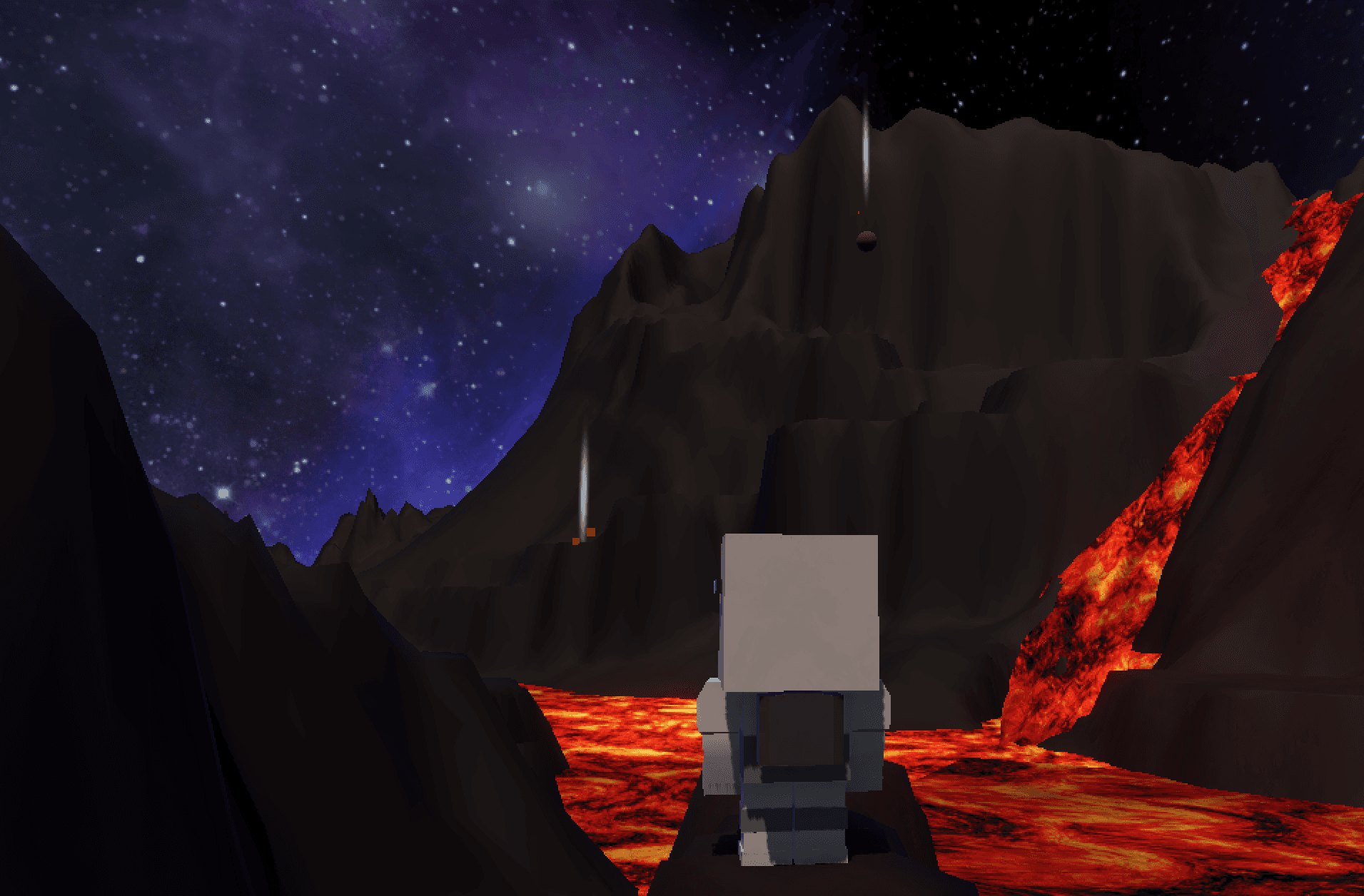
These screenshots show a mix of playable scenes, tutorial UI, worldbuilding, and Unity editor work from the project.
Lava world traversal
A playable scene showing the player moving through a dark sci-fi terrain with lava flows, cliffs, and a starry space backdrop.
1 / 5
What I Learned
This project helped me understand how different game systems have to come together for a game to feel playable. Movement, camera behavior, UI, level design, and art direction all affect each other. A mechanic can technically work, but if the environment does not guide the player or the UI does not explain what is happening, the game still feels unfinished.
I also learned that game development has a different kind of iteration loop than a lot of software projects. Small visual, timing, or placement changes can completely change the feel of a scene. Moving a puzzle object, adding an invisible barrier, changing dialogue, or making an interactable object easier to recognize can be the difference between a player feeling guided and a player feeling lost.
The team workflow taught me a lot too. Meeting multiple times per week, keeping a Kanban board, brainstorming together, and using Discord for regular communication helped us keep momentum even when the game had many overlapping systems. It also made me appreciate how much game development depends on integration work: everyone can build their own piece, but the project only works when those pieces feel coherent together.
Tech Stack and Tools
- Unity
- C#
- Unity WebGL
- Unity Input System
- Rigidbody physics
- Blender / 3D asset workflows
- Low-poly environment design
- Kanban-based team workflow