Overview
The Deschutes Hall Room Reservation Website is a room booking platform built for University of Oregon computer science spaces. We started from a real department pain point: the existing reservation process was outdated, difficult to use, and frustrating enough that many staff had complained about it. The old workflow split calendar visibility from the booking page, required systems administrator approval for all reservations, did not support easy booking edits or deletion, made users repeatedly enter personal information, gave limited detail about overlaps, and was only usable by faculty.
Our goal was to replace that workflow with a clearer, more flexible system where users could see availability while booking, manage their own reservations, and interact with the system through views that matched their role. The final project supports guest, student, faculty, and admin workflows across All Bookings, Map View, Calendar View, My Bookings, and Admin Tools.
Although this was built for CS422, it was not only presented to the class. We frequently presented progress, discussed requirements, and gathered feedback from stakeholders, including Deschutes Hall staff and University of Oregon IT staff, as the university explored what it would take to set up and potentially use the system in a real environment.
The public deployment is currently unavailable while the university evaluates the project for possible real-world use, but the source code is available on GitHub.
My Role
I worked on this project as part of a 4-person team and contributed heavily to the frontend and user-facing booking experience. My work spans the project from the first reservation widget prototype through late-stage fixes and documentation. I made significant contributions to the Map View, Calendar View, All Bookings, My Bookings, and Admin Tools interfaces, along with the booking logic that supported those views.
My work was not limited to styling. I built and refined major interaction flows: creating reservations, selecting rooms and time ranges, handling repeats and all-day bookings, preventing overlapping reservations, autofilling session information, gating booking creation behind login, showing different booking data by user role, and giving admins tools to search, edit, and delete reservations.
My Contributions
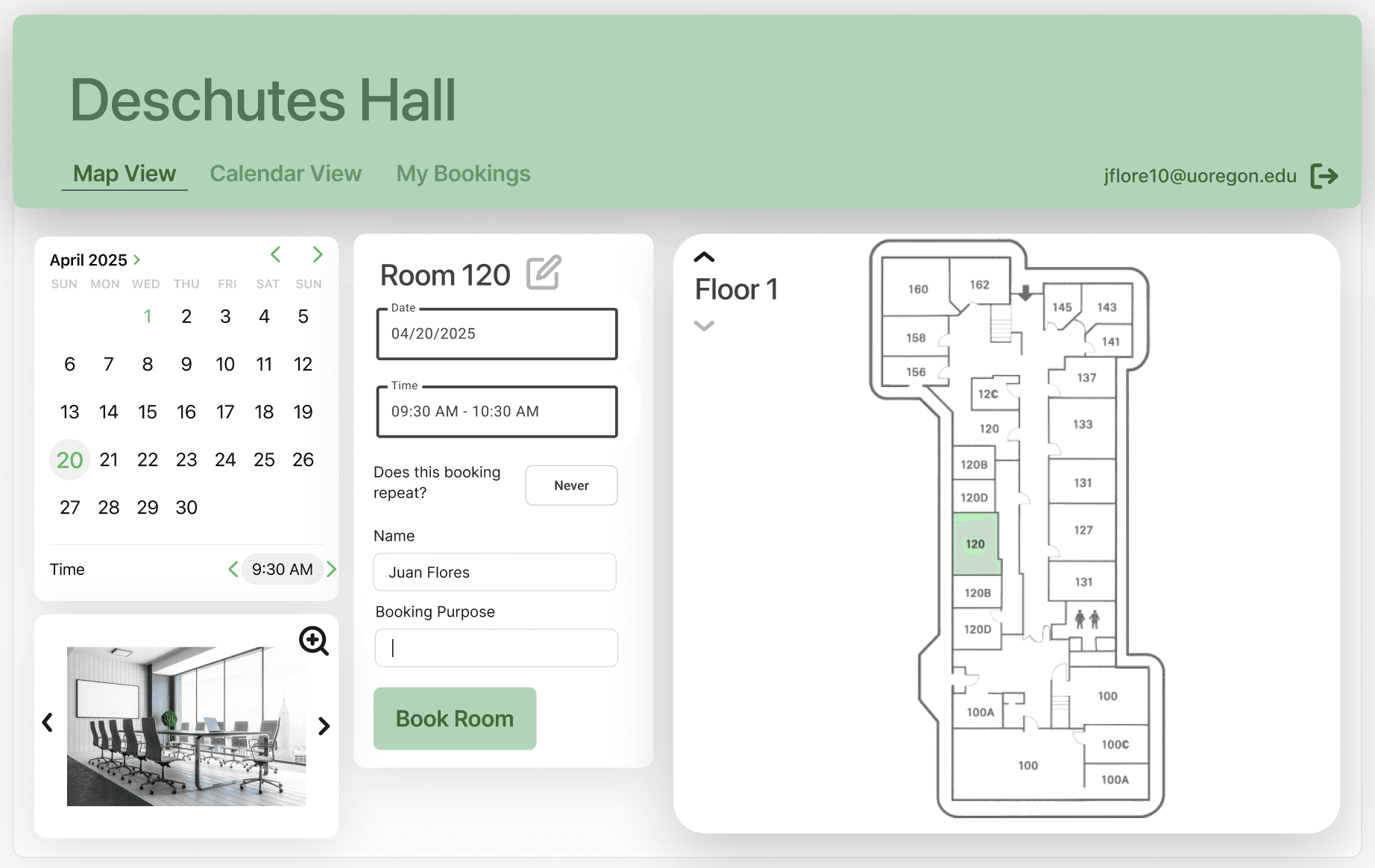
- Built the initial Map View reservation widget from a placeholder page into a usable booking form with room, date, time, repeat, name, email, purpose, and submit controls
- Iterated heavily on the booking UI, including room selection, 30-minute start/end time ranges, cross-browser time handling, booking form layout, and Map View styling
- Contributed significantly to Map View and Calendar View interactions so users could choose rooms, dates, and time slots from visual availability views instead of booking blindly
- Implemented and refined repeat bookings and all-day bookings, including more robust repeat conflict checks, clearer error messages, and all-or-nothing handling when a repeat series conflicted with existing reservations
- Added overlap prevention and next-available-time suggestions so users could understand why a booking failed and how to adjust it
- Added login-gated booking creation, session-based name/email autofill, and role-aware booking behavior for students, faculty, admins, and unauthenticated users
- Created role-specific All Bookings behavior, including limited student visibility, read-only faculty views, and admin edit/delete controls
- Built a major portion of Admin Tools reservation search by email, name, date, room, and time, with searchable results and editable booking details for admin workflows
- Added instruction cards and usability copy across All Bookings, Calendar View, and Map View so the interface explained how to make, modify, and manage reservations
- Helped with late-stage debugging, merge conflict resolution, README revisions, and documentation polish
What We Built
- A replacement for a difficult legacy reservation workflow that separated calendar visibility from booking and gave users limited control over their own reservations
- Role-aware student, faculty, admin, and unauthenticated user workflows
- All Bookings, Map View, Calendar View, My Bookings, and Admin Tools pages
- Firestore-backed booking, room, and user data
- Calendar and floor-map booking flows with room, date, time, repeat, and all-day reservation controls
- Login-gated booking creation with uoregon.edu email verification and session autofill
- Conflict detection, overlap prevention, and next-available-time suggestions
- Admin tools for searching, editing, deleting, approving, and managing reservations, rooms, and users
- Google Cloud Run deployment using Flask, Firebase, Gunicorn, and Cloud Build
Process
We used an Agile/Scrum workflow throughout the project. Our team worked in one-week sprints, met multiple times per week, and adjusted assignments dynamically as the project changed. In addition to our class presentation milestones, we regularly met with and presented updates to Deschutes staff and University of Oregon IT stakeholders, which helped us validate requirements and think through deployment, administration, and handoff concerns. Frontend and backend responsibilities shifted week by week, which helped us keep the workload balanced and made it easier to respond to bugs, stakeholder feedback, and integration issues.
That process mattered because this was not a static class demo. The project had many connected pieces: authentication, Firestore data, booking forms, map and calendar state, admin tools, role permissions, and deployment. Working in sprints helped us break the system into smaller deliverables, test each workflow as it became usable, and keep improving the product as we discovered edge cases.
Presentation Walkthrough
These screenshots come from our final CS422 presentation and show the main product flows, system design, and database structure behind the project.
System architecture
This diagram maps how authentication, role assignment, booking pages, admin dashboards, and Firestore collections connect across the application.
1 / 7
These carousel images are compressed previews. For a clearer view of the slides, open the PowerPoint presentation.
Project Documents
These documents show the planning, design, and handoff work behind the project.
- Software Requirements Specification (SRS): outlines the project goals, user roles, functional requirements, constraints, and expected system behavior
- Software Design Specification (SDS): documents the system architecture, data model, interface design, and implementation decisions
- Technical Documentation: captures setup, usage, and maintenance details for future developers or student teams
What I Learned
This project changed how I think about class projects, because it was tied to a real workflow that people at the university were actively frustrated by. It was not just about getting features to work for a demo. The more we talked with staff and worked through the reservation process, the more I noticed how much the small details mattered: who should be allowed to see certain booking information, how clearly the system explains conflicts, whether repeat bookings fail safely, and whether an admin can find and update a reservation without fighting the interface.
I also learned a lot about building in a team when the work is messy in normal, realistic ways. Some weeks I was building visible frontend pieces; other weeks I was debugging role behavior, tightening booking rules, resolving merge issues, or improving documentation so the project could make sense to someone outside our group. That made the project feel closer to real software work than a neatly scoped assignment, and it helped me get better at balancing user experience, implementation constraints, and handoff work.
Tech Stack
- Python
- Flask
- Firebase / Firestore
- HTML, CSS, JavaScript
- Bootstrap
- Google Cloud Run
- Gunicorn